Learning with Gemini, NotebookLM and Canvas
When I want to learn something, reading alone isn't enough. For topics I need to see, I ask Gemini An AI assistant from Google, the counterpart of ChatGPT. for an interactive page I can click through. I keep my own documents in NotebookLM A Google app where you upload your own documents. It answers questions based on them and shows where each answer came from. and pull out what I need from them. Both tools are from Google and work with a Google account.
In this guide
Canvas: an interactive mini page about what you're learning
Canvas is a view in Gemini where, next to the chat, something you can run and edit takes shape: a page, a simulation, a quiz, a document. I use it most for topics you need to see.
- Open Gemini and pick Canvas in the message box (in the tools under the text field).
- Describe what you want to learn and what it should look like: an interactive page, steps you can click through, a visualisation.
- Gemini writes the page and shows it in the preview right away. You switch between Code and Preview.
- You refine it in the chat: "add more detail in the DNS A service that turns the name of a site (for example majlo.dev) into the address of the server where it lives. step", "make it a dark theme".
- You can export the finished page or share it.
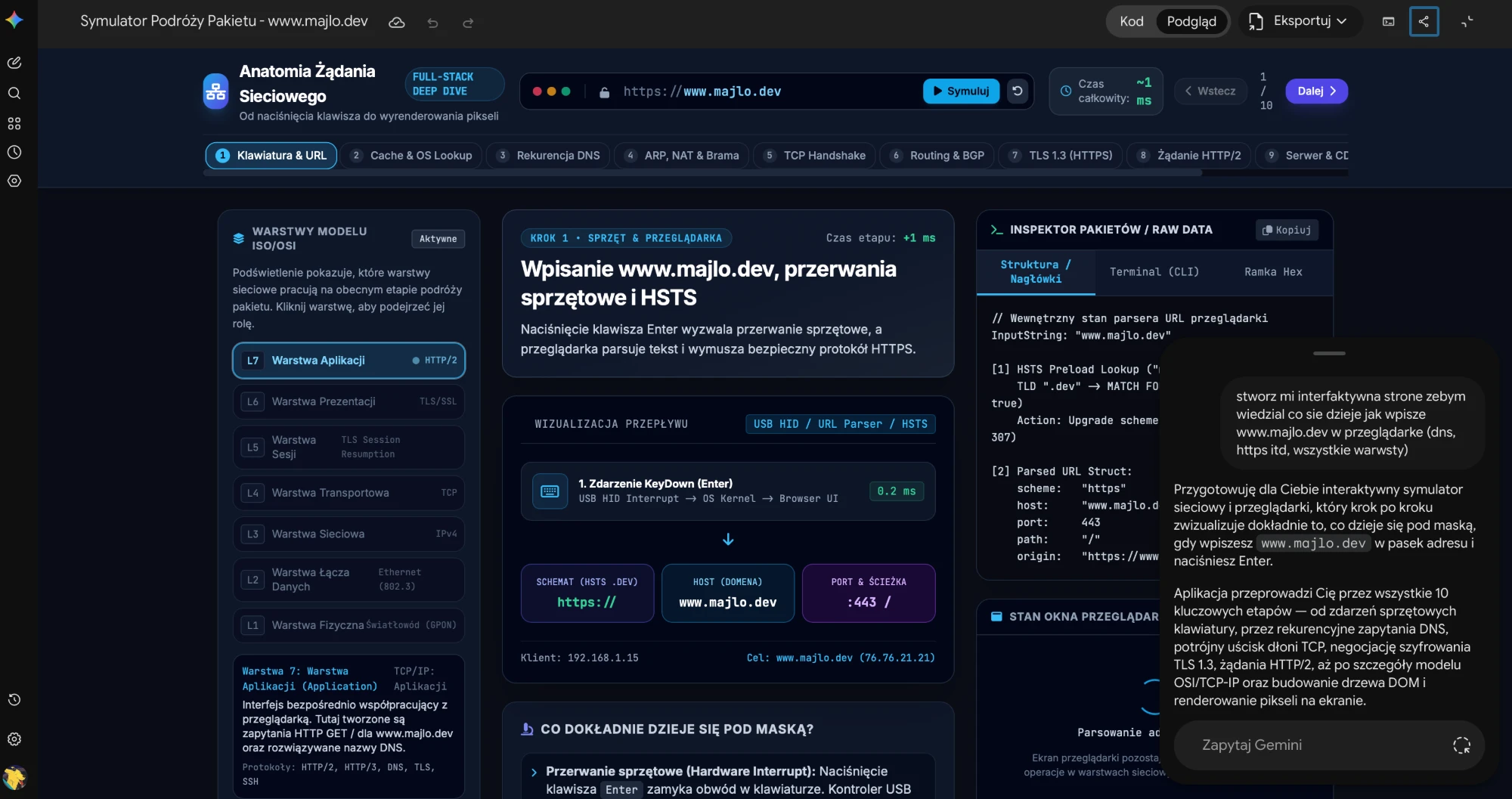
My example, the one I started with (I wrote it in Polish):
create an interactive page so I know what happens when I type www.majlo.dev into a browser (dns, https etc, all the layers)
It produced a simulator with ten stages: from pressing a key and parsing Splitting text into parts a program understands, for example an address into the site name and the path. the address, through cache A copy a computer saves so it does not have to fetch the same thing twice. and DNS, TCP The rules by which computers send data and check that everything arrived., TLS Encryption of the connection to a server, the reason there is a padlock in the browser. and HTTP/2 A newer version of the rules a browser uses to ask a server for a page. It can fetch many parts of the page at once., to rendering Displaying a page on the screen from the code the server sent. the page. Each step shows the OSI model A split of the path data takes through a network into seven layers, from the cable to the app, each with one job. layers, raw headers Notes at the start of a message between a browser and a server: who is asking, for what and in which format. and a short explanation of what is happening.
NotebookLM: a notebook with your own sources
In NotebookLM (notebooklm.google.com) you create a notebook and put sources in it: PDF files, Google documents, web pages, YouTube videos. The chat then answers based on those sources and shows where each answer came from.
- Create a new notebook.
- Add sources: upload a file, or paste a link to a web page or a YouTube video.
- Ask questions in the chat, or ask for something to be worked out, such as a summary or a study plan.
For me these are mostly my own documents, such as contracts. I upload them once and then ask directly, for example to have a clause from a document explained or something worked out from it. I don't have to attach the file every time.
explain in plain language what this document means for me and what I should watch out for
The notebook in Gemini and as a podcast
A NotebookLM notebook can be added as a source in a regular Gemini conversation (the plus button under the text field). Then you ask Gemini about the notebook's contents or have it build something from it in Canvas, without pasting documents.
NotebookLM can turn your sources into an Audio Overview: a conversation between two hosts about what is in your documents. It's a convenient way to listen to material on the go. You generate it in the Studio panel and after a moment you can listen in the browser.
What to watch out for
- With NotebookLM you upload documents to a Google service. Don't put other people's data or company documents there unless you are sure you may.
- A Canvas page is text written by a model. Its explanations can contain mistakes, and for anything where a decision depends on it (a contract, money), check the answer in the source itself.
- NotebookLM handles YouTube videos through their captions, so a video without speech or without captions won't work.